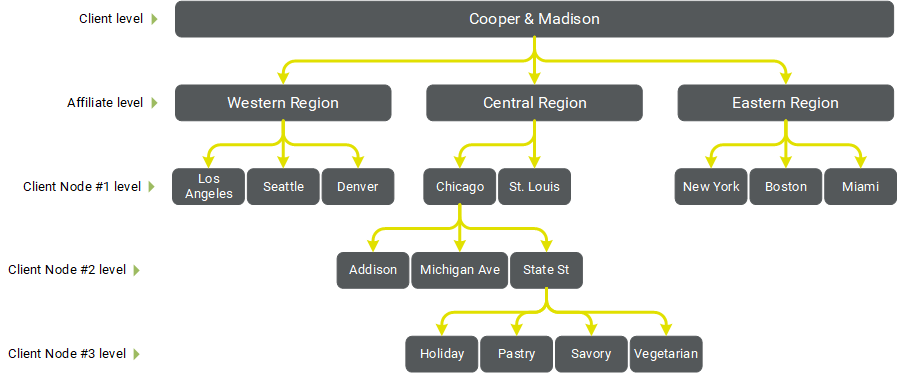
Client Hierarchy
Your Distributed Marketing Client Hierarchy is similar to an organization chart; it represents the structure of your company, starting with the top-most "corporate" level, then working downward into smaller levels, which might represent your various divisions, brands, regions, or franchises.
The Client Hierarchy is used to determine "Who can access what?" when creating a Mailing. The different levels in the Hierarchy (up to a maximum of five levels) are mainly used to grant or limit access to various marketing Assets, such as Images, Links, Brands, Templates, etc.
If every user in a company needs to be able to access every Asset, then that company's Hierarchy can probably be very simple. For many clients though, access to the various marketing Assets used in their Mailings needs to be restricted. For example, perhaps only certain users from specific franchises or regions should have access to a certain set of images. Or, users working with a particular brand or product line need to be able to access a set of background colors and fonts. To satisfy these requirements, the company would need a more complex Client Hierarchy, with different restrictions imposed at each level. For more details on how access is granted to a particular Asset type, see Assign Assets.
Within the Distributed Marketing Help Center, each of the items in the Client Hierarchy is referred to as an Entity.
Client
The top level Entity is simply called the Client. Many features and assets within Distributed Marketing are assigned at this top-most level. In most cases the Client should be the parent corporation.
-
Example: The sample client for this article is a fictional company called Cooper & Madison that owns a chain of cooking schools. Within the Distributed Marketing platform, Cooper & Madison would be defined as the Client.

Affiliate
The next level down in the Client Hierarchy is called the Affiliate. A Client can have as many Affiliates as needed. You can use the Affiliate level to separate out different brands or product lines, or possibly different regions. Several types of Assets in Distributed Marketing can be assigned at the Affiliate level.
-
Example: Cooper & Madison splits their business up into three geographical regions within the United States: Eastern, Central, and Western. These three regions will be set up in Distributed Marketing as Affiliates.

Client Nodes
The next level down in the Client Hierarchy is called the Client Node. Distributed Marketing supports up to three levels of Client Nodes, for a total of five possible layers in the ClientHierarchy. The Client Node is the most granular level, and is often used to represent individual franchises within the parent corporation. A client can have as many Client Nodes as needed.
-
Example: Cooper & Madison uses all three Client Node levels to break out their three different Affiliates. The first Client Node level indicates the city. The second Client Node level indicates the address of the specific cooking school within that city. And the final Client Node level represents the different classes held at that location.